Guided setup if tmux isn't installed
Not every server ships with tmux out of the box. If it's missing, Remote IDE shows install instructions for common Linux distributions right in the server settings — Ubuntu/Debian, macOS via Homebrew, Fedora/RHEL, CentOS 7, and Arch Linux — each with a ready-to-copy install command, so getting persistent sessions running is a copy-paste away, not a support ticket.
- Built-in install guide for common Linux distros
- Tap-to-copy install commands
- Works over your existing SSH connection
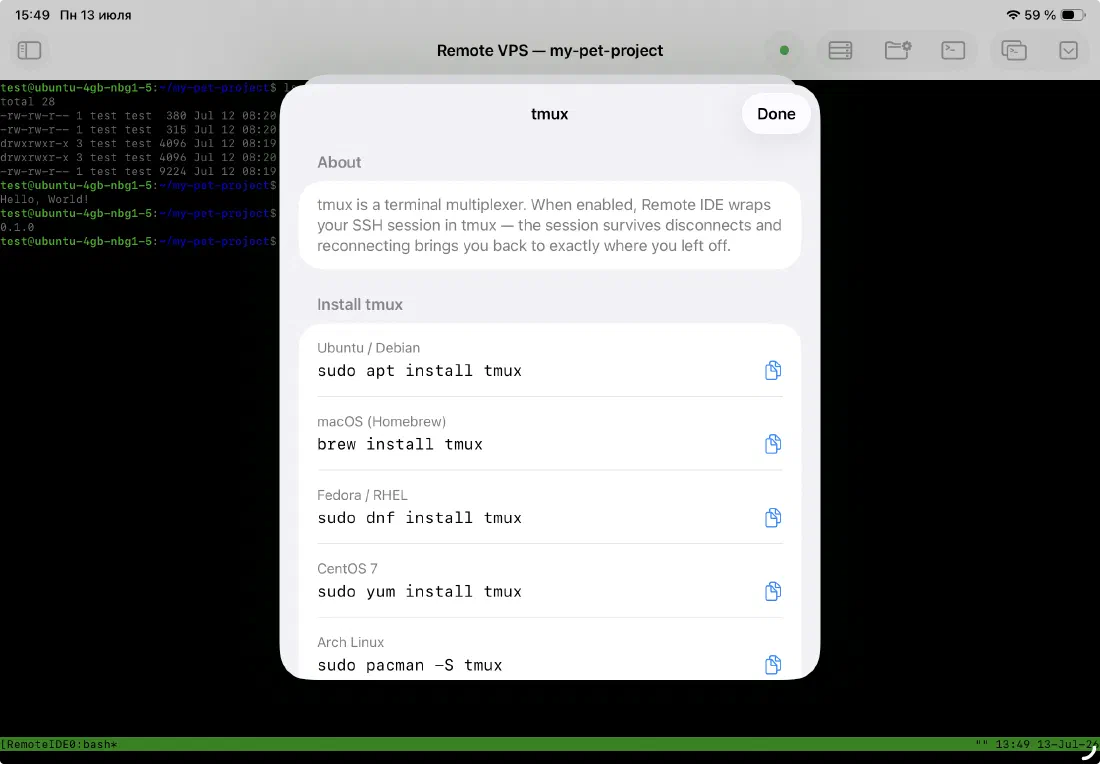
Sessions that outlive the app
Switch away to another app, lock your iPad, or lose Wi-Fi for a minute — a plain SSH session dies the moment the connection drops. Turn on "Use tmux" for a server and Remote IDE wraps the session in tmux on the server side instead, so the shell keeps running whether or not you're connected to it.
Your long-running build, your `npm run dev`, your tail on a log file — none of it gets interrupted by backgrounding the app.
- Server-side tmux session survives disconnects
- Long-running commands keep running while you're away
- One toggle per server — no manual tmux commands required
Reattach exactly where you left off
Reopen Remote IDE and it reattaches to the same tmux session automatically — same scrollback, same running process, same terminal state. You don't type tmux attach yourself; the app handles session naming and reattachment for you.
The AI agent window uses its own dedicated tmux session, kept separate from your console session, so an agent run and a manual terminal session on the same server never collide.
- Automatic reattachment on reconnect — no manual tmux commands
- Scrollback and running processes preserved between sessions
- Separate sessions for the console and the AI agent window
Ready to code on iPad?
Download Remote IDE and connect to your server in under a minute.