A VS Code-style color theme, adapted for iPad
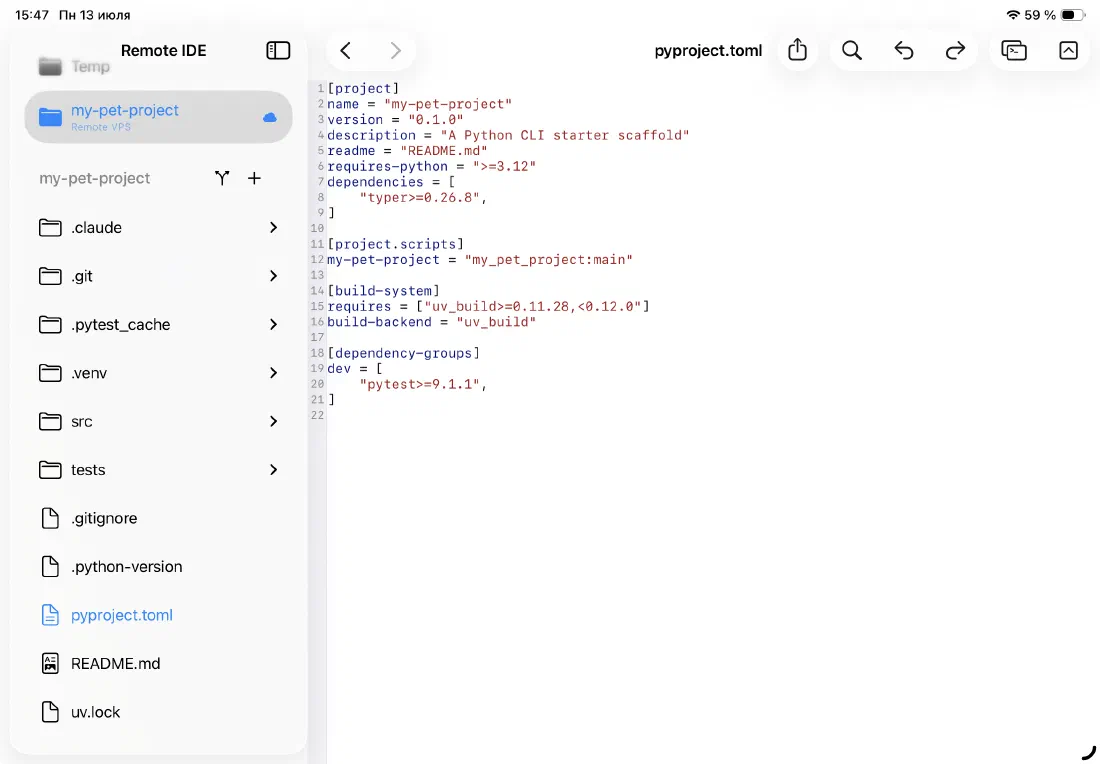
The color scheme is inspired by Visual Studio Code's default dark and light themes — familiar if you already spend time in VS Code on your Mac. Keywords, strings, comments, types, and functions each get a distinct, readable color in both dark and light appearances — a TOML file, for example, gets clearly colored section headers, keys, and string values even in light mode.
The theme adapts automatically to your system appearance — no manual toggle in the app.
- Keywords: blue (dark) / purple (light)
- Strings: warm orange (dark) / dark red (light)
- Types and classes: teal in both modes
- Comments: italic green in both modes
- Functions: warm yellow (dark) / brown (light)
Tree-sitter parsing — no regex shortcuts
Every language is parsed using Tree-sitter — the same incremental parser used in Neovim, Helix, and VS Code. It builds a real syntax tree as you type, so highlighting stays accurate even in complex nested structures.
The editor uses a two-phase rendering strategy: plain text appears instantly when you open a file, and the fully highlighted state is built on a background thread and swapped in without blocking the UI.
- Incremental re-parse on every edit — only changed subtrees are reprocessed
- Background parsing keeps the UI responsive on large files
- Accurate highlighting inside strings, templates, and multiline constructs
22 languages out of the box
Open any of the supported file types and the editor picks the right grammar automatically based on the file extension. No manual mode switching needed.
- Swift, Python, JavaScript, TypeScript, TSX
- Go, Rust, C, C++, Java, Ruby, PHP
- Bash / Zsh / Shell, HTML, CSS, SCSS
- JSON, YAML, TOML, Markdown, SQL
Editor settings you actually use
A small set of focused settings covers the things that matter most for coding on a touchscreen. No settings bloat — just the options that change how you work.
- Font family and size — choose any monospaced font installed on your iPad
- Line numbers on or off
- Word wrap on or off
- Indent with tabs or spaces, configurable width (2, 4, or custom)
- Built-in find interaction — tap the search icon or use the keyboard shortcut
Ready to code on iPad?
Download Remote IDE and connect to your server in under a minute.