Your command library
Remote IDE lets you save any command you run frequently — build scripts, server restarts, test runners, deployment commands, log tails — under a short name. Open the Commands sheet, tap a command, and it executes instantly in your active SSH session.
Commands are shared across servers. If you run the same npm run build on three different servers, you only need to save it once.
- Unlimited saved commands
- Name + command text for each entry
- Shared across all servers
- Available in the main terminal and the AI agent window
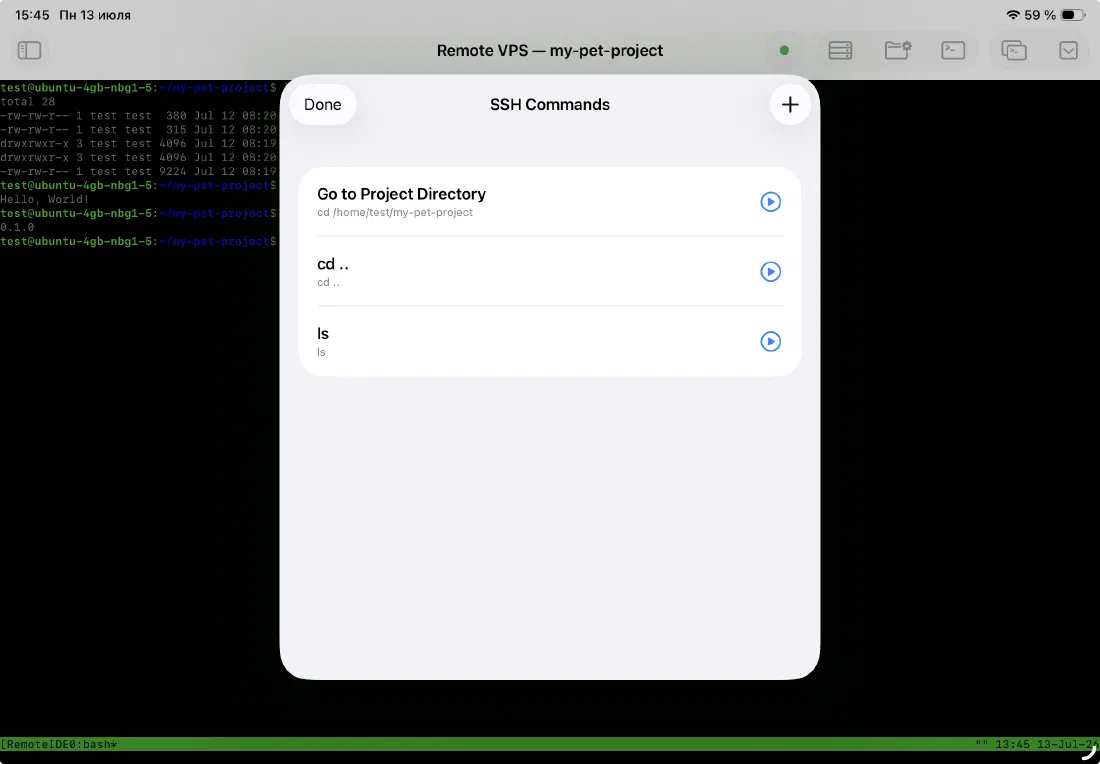
Built-in: Go to Project Directory
Every commands sheet has a built-in entry at the top: Go to Project Directory. It runs cd <your configured remote path> instantly. This is the command you run every time you open a new terminal session, and it's always one tap away without having to type or remember the path.
- Always at the top of the list
- Uses the active remote path for the current server
- Updates automatically when you change the active remote path
Add, edit, and delete
Commands are managed entirely within the app. Tap the + button in the commands sheet to add a new one. Swipe left on any command to reveal edit and delete actions. Changes take effect immediately — no restart, no sync step.
- Add commands via the + toolbar button
- Swipe left to edit or delete
- Confirmation dialog before deletion
Ready to code on iPad?
Download Remote IDE and connect to your server in under a minute.