Turn it on per remote path
Remote Filesystem is a toggle on each named remote path, not a global setting. Keep it off for projects where you want the traditional upload/download workflow, and turn it on for servers where you'd rather edit in place — a staging box, a Raspberry Pi, a production config directory you only touch occasionally.
- Per-remote-path toggle — mix and match across servers
- Works over the same SSH connection, no extra setup
- Git change tracking and the terminal keep working alongside it
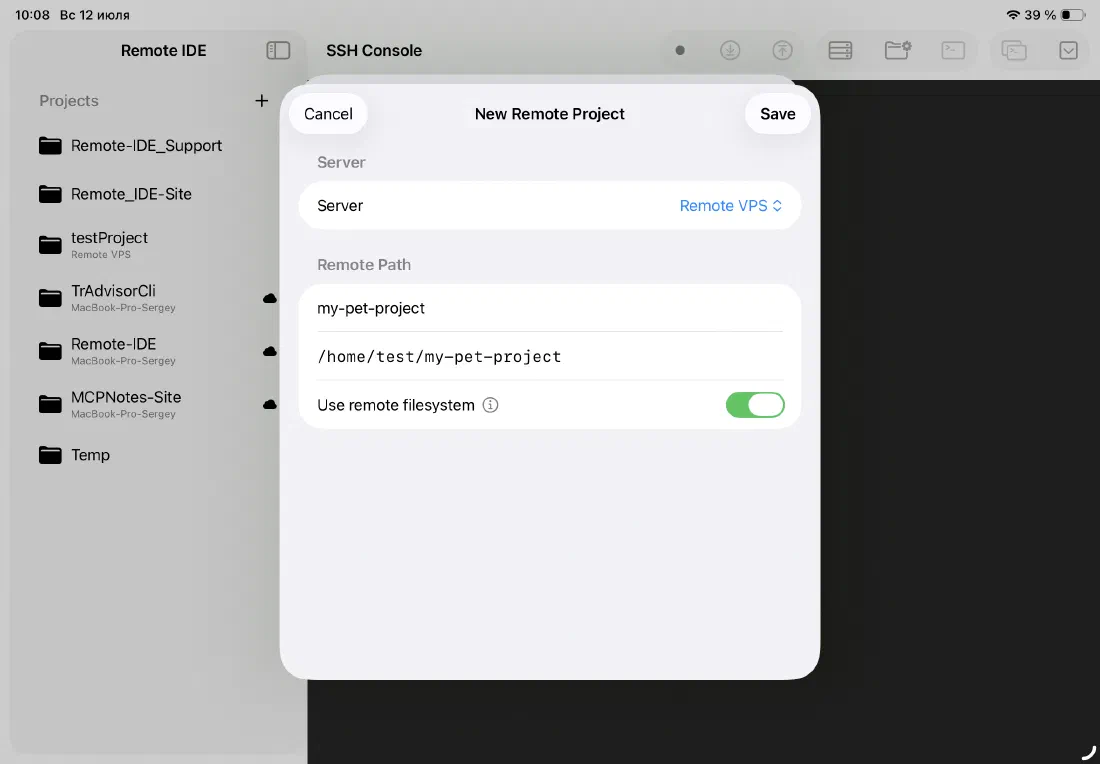
Edit files where they actually live
Turn on Remote Filesystem for a server's remote path and the sidebar switches to browsing that server directly over SFTP. Open a file, edit it, save — the change lands on the server immediately. There's no local copy to keep track of.
This is a different model from pushing and pulling a project tree: instead of syncing state between your iPad and the server, you're working on one copy, in one place.
- File tree browses the remote server directly, not iCloud Drive
- Open and save files over SFTP with no intermediate step
- Nothing to push, pull, or keep in sync
No stale copies, no drift
Traditional sync means two copies of your project can disagree — an edit on the server, an edit on your iPad, and now you're merging by hand. Remote Filesystem Mode removes the second copy entirely, so what you see in the editor is exactly what's on disk on the server.
That also means changes made outside Remote IDE — by a deploy script, a teammate, or a process running on the server — show up the moment you reopen the file.
- Single source of truth: the server
- No merge conflicts between local and remote state
- See external changes as soon as you reopen a file
Ready to code on iPad?
Download Remote IDE and connect to your server in under a minute.