AI agent in a dedicated window
Run Claude Code or another AI agent in its own Remote IDE window while you review its changes in a second window. The agent writes code, the second window shows you the diff.
This is the workflow that makes AI-assisted development actually pleasant on iPad — no tab switching, no context loss.
- Agent window runs
claudein your SSH terminal - Editor window shows the files being modified
- Review changes in real time as the agent works
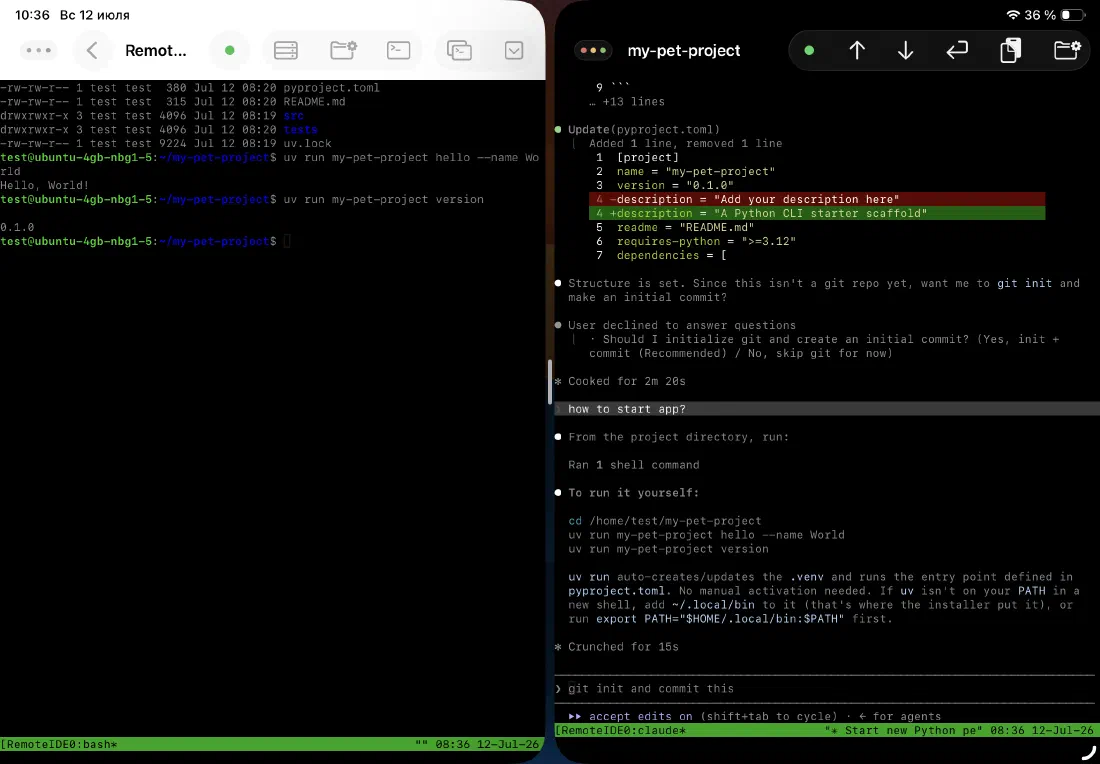
Split View: code and docs side by side
Open Remote IDE in Split View alongside Safari, Notes, or any other app. Read the documentation on the right while you edit code on the left — no switching, no losing your place.
Resize the split to whatever ratio works for you. Remote IDE adapts its layout as the window shrinks or grows.
- Editor + browser for documentation lookup
- Terminal + notes for recording commands
- Two Remote IDE windows on two different servers
Stage Manager: multiple windows, full control
With Stage Manager enabled, you can run multiple Remote IDE windows simultaneously — each with its own project, SSH connection, and state. Switch between them instantly without losing context.
Stage Manager treats each window as an independent workspace. You can have your backend server in one window and your frontend in another, both connected over SSH.
- Unlimited concurrent Remote IDE windows
- Each window maintains its own SSH session
- Independent file trees and editor state per window
- Drag files between windows via the Files app
Split View
- Open Remote IDE
- Tap the three dots (···) at the top of the screen
- Select Split View
- Choose the second app from your home screen
Stage Manager
- Enable Stage Manager in Control Center
- Open Remote IDE — it appears as a window
- Tap and hold the Remote IDE dock icon
- Select New Window for a second instance
Ready to code on iPad?
Download Remote IDE and connect to your server in under a minute.