Available in the editor and the terminal
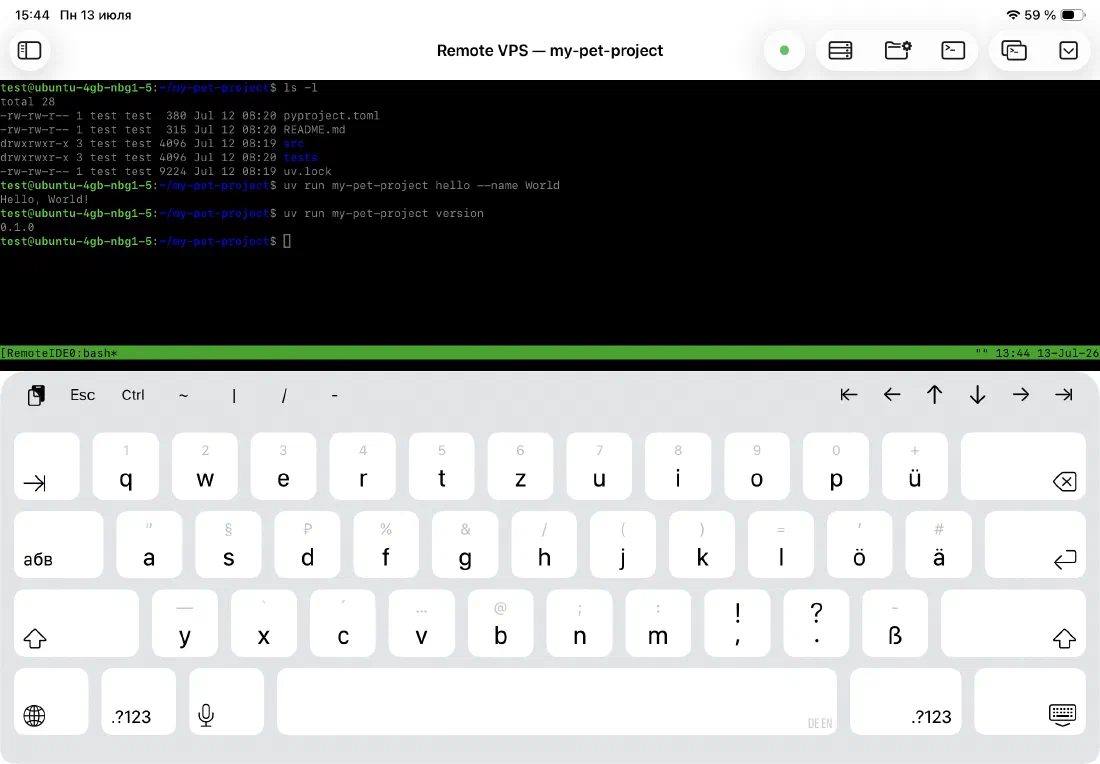
The toolbar appears whenever the editor or the SSH terminal has keyboard focus, and it adapts to what you're doing. In the terminal, it swaps in shell-specific keys — Esc, Ctrl, tilde, pipe, slash, and dash — plus a row of arrow buttons for jumping to the start or end of the line and moving through command history, so you're not reaching for gestures mid-command.
- Esc and Ctrl — for vim, nano, and Ctrl+C
- Tilde, pipe, slash, and dash for paths and shell syntax
- Jump-to-start / jump-to-end and arrow navigation
- Active in the SSH terminal and the AI agent terminal window
The keys missing from the iOS keyboard
The iOS software keyboard is great for writing prose. It's not great for writing code. The characters you type constantly — Tab, curly braces, square brackets, backtick, pipe, tilde — are buried in secondary keyboards that require multiple taps to reach.
Remote IDE adds a dedicated toolbar row above the keyboard with exactly those characters. One tap, no modifier keys, no keyboard switching.
- Tab — for indentation
- Curly braces
{ } - Square brackets
[ ] - Parentheses
( ) - Dot
., equals=, hash# - Backtick, pipe, tilde, underscore, and more
Works with hardware keyboards too
If you use a Magic Keyboard or Smart Keyboard Folio, the toolbar stays out of the way — no extra row of software keys cluttering the screen when you have a full physical keyboard. It appears only when the software keyboard is visible.
Ready to code on iPad?
Download Remote IDE and connect to your server in under a minute.