The two-window workflow
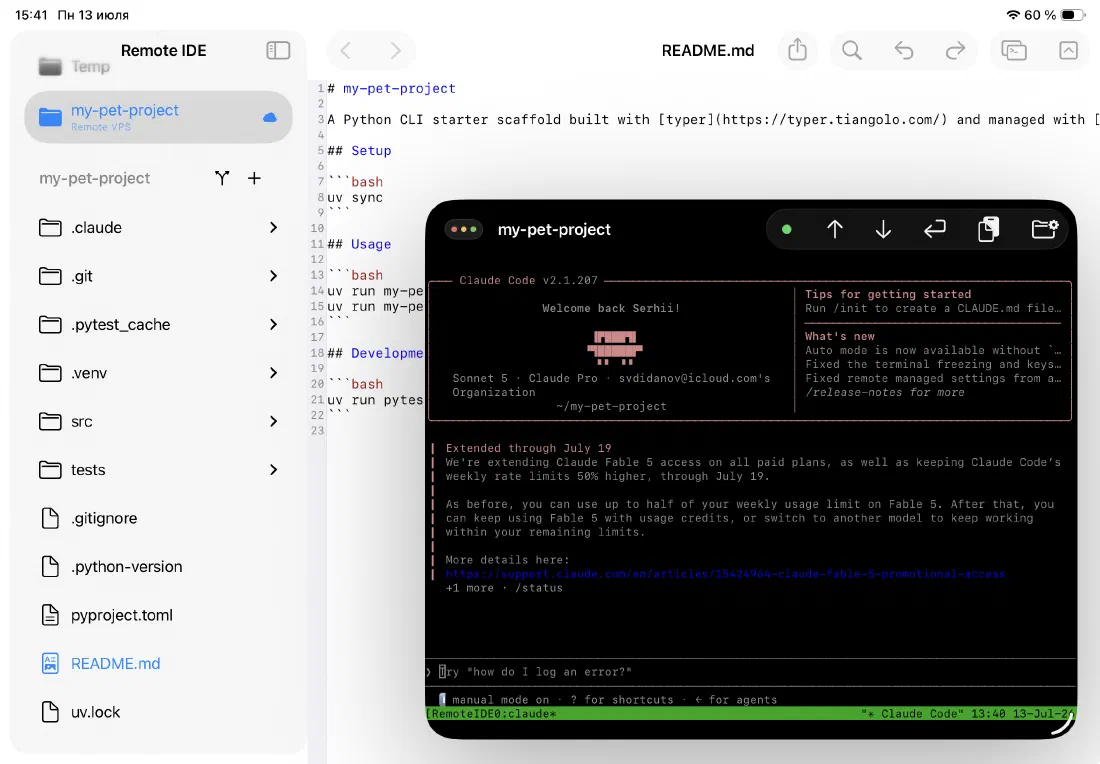
This is where Stage Manager and Split View really earn their place. Open the agent window and your editor side by side — the agent writes code in one window while you review the changes in real time in the other.
The file tree updates automatically as the agent creates or modifies files. You see exactly what it's doing as it happens, without switching away from your review.
- Agent window runs
claudeor another tool in your SSH terminal - Editor window shows files as they are modified
- Git status panel tracks every change the agent makes
- No manual refresh — the file tree reloads on transfer events
A dedicated window for your AI agent
Remote IDE opens a separate window just for the AI agent — its own SSH session, its own terminal, its own state. You can keep your editor and file tree in one window while the agent runs in another, without any tab switching or context loss.
The agent window connects to the same server automatically when you open it. If the connection drops, it reconnects on its own — so you can leave a long agent run going without babysitting it.
- Independent SSH connection from the main editor window
- Automatic reconnect on connection loss
- Always forced into dark mode for readability
Run Claude Code — or anything else
The agent window is just a terminal connected to your server. Run claude, aider, continue, or any other CLI-based AI tool you already use. No special integration needed — if it runs in a terminal, it runs here.
Because the agent runs on your remote server, it has full access to your codebase, your build tools, your git history, and your environment variables. It can edit files, run tests, commit changes, and push — all without leaving the iPad.
- Claude Code, Aider, and any other terminal-based agent
- Full access to your server's environment and tools
- Agent can read, write, and run code like it would on a desktop
Agent-optimized toolbar controls
Interacting with an AI agent often means confirming prompts, navigating output, and occasionally nudging a stalled session. The agent window toolbar has buttons for exactly that — without needing to reach for a keyboard.
- Up / Down arrow buttons for navigating agent prompts and history
- Enter button to confirm prompts with one tap
- Paste image from clipboard — send screenshots directly to the agent
- Quick access to saved SSH commands
- Live connection status indicator in the toolbar
Ready to code on iPad?
Download Remote IDE and connect to your server in under a minute.